Blog Download 8.3

 Michael Zülsdorff
1 decade ago
Michael Zülsdorff
1 decade ago
Blog
A component allowing members to create simple blogs in your social network.
Note: Blog requires Textarea Support to be installed and enabled, first.
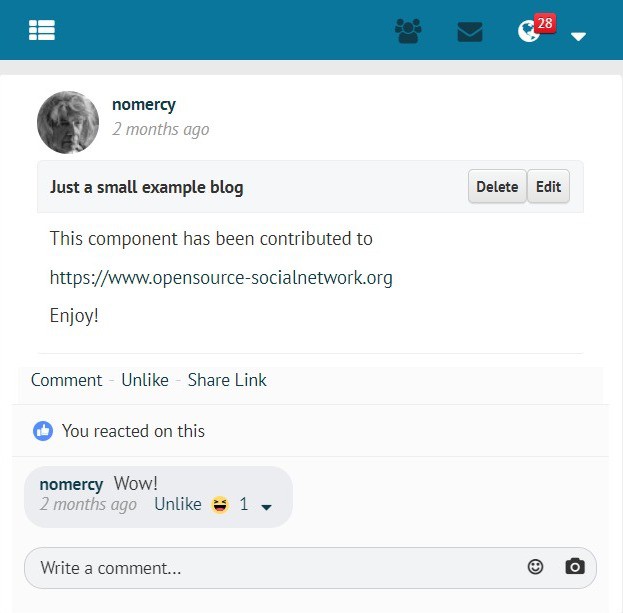
- Blog page layout on PC used with GoBlue theme
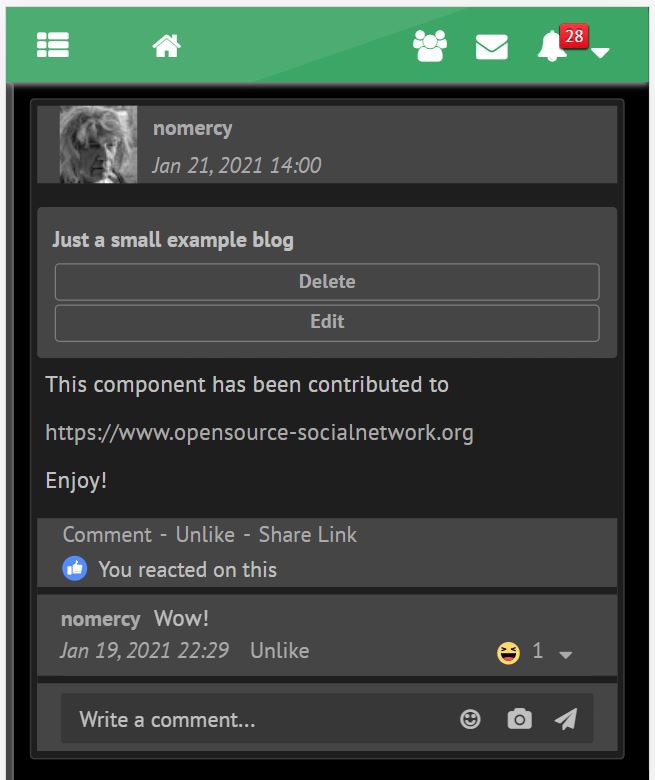
- Blog page layout on cellphone with GreenByGreen theme in darkmode
For your convenience, all Ossn default language files are already in place, but (except of the English and German one) still need translation.
Volunteers are welcome!
You can send your translated ossn.XX.php language files to
[email protected]
Changes:
V 8.3
- making use of Ossn 8.6's new
time_updateddatabase feature forlast-editedtimestamps
V 8.2
- fixed Ossn 8.5 compatibility issue with default notification views
V 8.1
- added support for Openteknik's Share Post component
https://www.openteknik.com/product/view/369/share-post - added Persian and Sinhalese language files
V 7.2
- added 'Latest Blogs' gadget
V 7.1
- refined search (Blog contents AND title) plus reduced false positives from CSS inside of the contents
- added Hungarian language file
- verified to work with PHP 8.2
V 6.5
- making use of Textarea Support 6.7's enhanced image scaling mechanism
V 6.4
- removed superfluous div from view page which was consuming extra space
V 6.3
- added wider margin to blog pages
V 6.2
- fixed: blog pages overlapping friends column on the right
- added: blog title to comment and like notifications
- changed: the list of blogs created by a member appears on profile subpage now (like photo alblums)
V 6.1
- Ossn 6.x support
- verified PHP 8 compatibility
- exclude blogs of blocked members from blog search
- fixed alignment of Blog comments section
- added Korean localization
Outdated Ossn 5.x releases
V 2.19
- "Share" button on top of blog removed. Replaced by "Share Link" below the blog if Content Sharing 2.0 is enabled
V 2.18
- Blog Sharing delegated to https://www.opensource-socialnetwork.org/component/view/4922/content-sharing . It needs at least Content Sharing 1.1 to enable sharing of blog pages
V 2.17
- fixed appearance of blog comments on wide screens
V 2.16
- removed proprietary elements and colors for smoother theme integration
- automatic grid layout of action buttons on narrow devices
- usage of complete screen width
- 'Confirm' dialog when trying to delete a blog
V 2.15
- fixed crash on edit- and add-page if member is not logged in
V 2.14
- requirements adapted to Ossn 5.4
V 2.13
- blogs with complete list of comments may be shared anywhere now
- copy share link to clipboard for easier pasting
- fixed overlapping of blog wall entries if blog starts with an image or a video
- added Chinese language file
- adapted to TextareaSupport 2.8
V 2.12
- refined components requirement check
- added Indonesian language file
- license update
V 2.11
- compatibility fixes for TextareaSupport 2.5
V 2.10
- added blog content search
V 2.9
- fixed shared link for sites with Ossn root in a subdirectory
V 2.7
- Android compatibility fix for share widget (make link selectable)
V 2.6
- added 'Share' button displaying a link to be used outside your Ossn community
- ugly 'sort by' link replaced by bootstrap button
V 2.5
- fixed issue with lowercase tab on profile page
- placeholder added to title field to prevent it from being left blank
V 2.4
- Blog lists will display a 'last edit' timestamp now and may be sorted by date (most recent on top) or by member names (alphabetically)
- In case you're not satisfied with the format of the timestamp you can easily customize it by editing line #23 of the component's language files
V 2.3
- fix disappearing blog previews from newsfeed page 2 and above
V 2.2
- hide blog pages from logged out members
V 2.1
- some sanitizing added to blog preview
V 2.0
- WYSIWYG editing
- a 300 character preview of the blog is shown on the main wall
- blogs can be liked and commented
- blog owner notifications on likes and comments
- cancel/back links for easier navigation
V 1.0
- initial release

JACK AMPERES
Replied 7 years ago
is there a way i can have blog post show up even with out a need to be logged in? as i want to be able to share blog post to other social networks as well. so that others who are not yet members can see whats going on more in my community.

Ranjan Rai
Replied 7 years ago
It would be nice if blog results are also shown in the search result
Ranjan Rai
Replied 7 years ago
I am wondering with the V 2.2 update for hide blog pages from logged out members.
I personally consider Blogs are the good source of information and this should be opened for every user or there should have been an option for the blog writer to publish their post globally or the availability of the post for the logged in users. Please let me know your thoughts on this.
Michael Zülsdorff
Replied 7 years ago
Thanks for reporting Johannes and Massimo.
V 2.5 is taking care of your issues.

Johannes Genberg
Replied 7 years ago
Hello
Love this component. However, when I look at it in the profile in Esperanto, the link to it is shown in small text (blogoj). I think this must be because the link takes it's text from somewhere with a big B in the English translation, but where I use a small b in the Esperanto translation. Maybe you could change it so that it looks for the text here instead?:
'blog' => 'Blogo',

Massimo Biffi
Replied 7 years ago
arggg!!! this engine automatically remove the code!! >:(
in the line 15 after name="title", add:
value="Title or somethig you prefer"
Massimo Biffi
Replied 7 years ago
The provisional workaround it's simple:
Edit the file components/Blog/plugins/default/forms/blog/add.php
and modify
<input type="text" name="title" />
to
<input type="text" name="title" value="Title" />
It's no good but work's.
The ideal was be to add a content control to prevent try to sabe if the field Title is empty
Massimo Biffi
Replied 7 years ago
There is a serious bug.
If you write the text in TextArea and forget to put the Title, when you click on Save, you get a warning that you cannot save the blog, and it delete all the text you just wrote.
This is very annoying, especially if it has been a long text.
The engine would have to warn you that the Title is missing and then allow the user to save the blog.
As provisional workaround you could put a fixed generic title that the user will then modify. This eliminates the possibility of losing the text, while solving the problem more consistently.

Estee Andr
Replied 7 years ago
Thank you very much for it!

Brenda Aguero
Replied 8 years ago
When I want create a blog jump a red text, it says: "Can not create blog."
How I can solve this problem?