Goblue Registration Page Download 6.1dev8

 Michael Zülsdorff
4 years ago
Michael Zülsdorff
4 years ago
Goblue Registration Page
A component showcase in response to
Home page: transform registration form into a link which will
- Create a separate (standalone) registration page as a first step (dev1)
- Replace the core index.php file by a customized copy (dev2)
- Add a login dialog to the index page and center the output (dev3)
- Utilize Ossn's language files to replace a default translation (dev4)
- Create a customized widget without header derived from Ossn's default widget (dev5)
- Replace the core login2.php file (login form) by a customized copy (dev6)
- Make it work out of the box if Private Network component is installed (dev7)
- added compatibility with logo upload feature introduced by Ossn 7.3 (dev8)
Michael Zülsdorff
Replied 2 years ago
Yes Eric,
because the option of uploading your own custom logo from the admin back-end was the first time available with Ossn 7.3. The Goblue Registration Page project started at Ossn 6.x times, though. And simply could not be aware of that those days. ;)

Eric redegeld
Replied 2 years ago
Michael Zülsdorff you rocks
Eric redegeld
Replied 2 years ago
Shall try the dev7 what see is that this module breaks my theme go blue logo. As in its gone. shadow.nlsociaal.nl
Michael Zülsdorff
Replied 2 years ago
Thanks Eric for reminding me I never uploaded the promised 6.1dev7 release. 🤦♂️
Eric redegeld
Replied 2 years ago
stumble on this, and just what i need and users want.
thank you
Michael Zülsdorff
Replied 3 years ago
Thanks for your feedback, Noah!
Actually, (and initially) these little lessons were mainly meant to explain which way the default Goblue landing page can be changed. But you are right: If this gets to be used in a production environment, the new public registration page should be accessable of course - and preferably without any extra changes of the Private Network component. ;)
Thus, I'll prepare dev7 soon - showing how to achieve this.

Noah Domani
Replied 3 years ago
Figured out how to get it working with private network
PrivateNetwork/classes/PrivateNetwork.php under allowed pages 'added register', to get past it.
Noah Domani
Replied 3 years ago
Is there a way to make this work while having the private network component enabled?

David Booth
Replied 3 years ago
Thanks Michael for a very helpful series of exercises. It remains for me to tackle my own component! On a test install with backup and all due diligence.
Michael Zülsdorff
Replied 3 years ago
Ok, as a further exercise
dev6 is altering Ossn's default login form to the layout shown in the screenshot David provided some days ago.
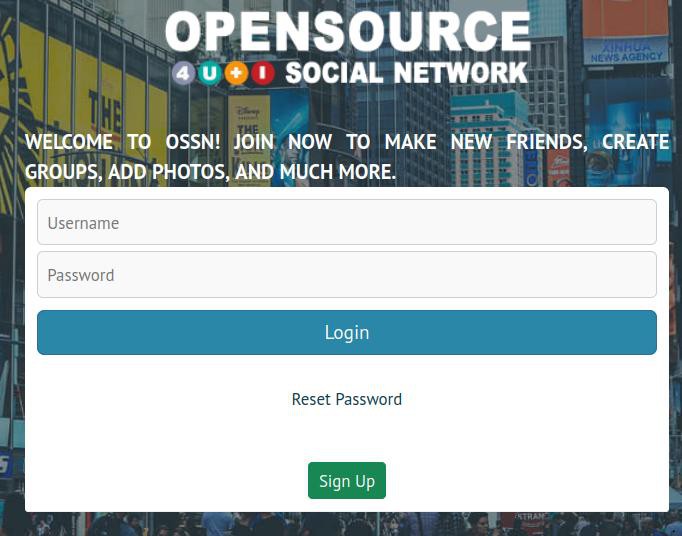
Again, we don't want to change an Ossn's core file, but apply our changes to a copy inside of this component to circumvent being overwritten with upcoming Ossn releases.
So the next step is to find the file with the code of the original login form, and there is already a hint in our index.php
ossn_view_form('login2',....
That's: The function ossn_view_form expects some input from a file named login2.php in order to return the HTML <form>....</form> element we need to login.
Like all other Ossn core plugins, login2.php is located in a subdirectory of ~/system/..., specifically in ~system/plugins/default/forms.
Now that there is already a GoblueRegistrationPage/plugins/default/ directory, all we have to do is create a forms subdirectory and copy login2.php into it. To distinguish it from the original, we simply rename login2.php to GoblueRegistrationPageLogin.php here. Of course, we must then also pass the changed file name to the ossn_view_form function, and change the call to
ossn_view_form('GoblueRegistrationPageLogin',....
Compare login2.php to GoblueRegistrationPageLogin.php and see what has been changed...
And in case your not happy: There's a lot of examples in https://mdbootstrap.com/docs/standard/extended/login/ and other bootstrap tutorials. All this is no longer Ossn specific, so please don't ask which way to make a green button red and stuff. ;)