Goblue Registration Page Download 6.1dev8

 Michael Zülsdorff
4 years ago
Michael Zülsdorff
4 years ago
Goblue Registration Page
A component showcase in response to
Home page: transform registration form into a link which will
- Create a separate (standalone) registration page as a first step (dev1)
- Replace the core index.php file by a customized copy (dev2)
- Add a login dialog to the index page and center the output (dev3)
- Utilize Ossn's language files to replace a default translation (dev4)
- Create a customized widget without header derived from Ossn's default widget (dev5)
- Replace the core login2.php file (login form) by a customized copy (dev6)
- Make it work out of the box if Private Network component is installed (dev7)
- added compatibility with logo upload feature introduced by Ossn 7.3 (dev8)
Michael Zülsdorff
Replied 3 years ago
Correct.
Either to YOUR_THEME/plugins/default/forms/
or THIS_COMPONENT/plugins/default/forms/
dev6 will make use of the latter option

David Booth
Replied 3 years ago
It'd be pretty if the two fields were about 80 char wide, the 'reset password' link as a button and all three buttons on one line.
David Booth
Replied 3 years ago
Found it! ./system/plugins/default/forms/login2.php
But that one is not for editing. It needs to be replicated in my theme, right?
I'll wait for dev6.
This is exciting!
Michael Zülsdorff
Replied 3 years ago
Uhh ... still difficulties to locate login2.php in the source tree?!?
Use the find command again, because we need to customize it with dev6 to get closer to your layout idea. ;)
David Booth
Replied 3 years ago
Sweet. So display the bare form.
Which is somewhere?
and loaded somehow? into
$contents = ossn_view_form('login2', array(
'id' => 'ossn-login',
'action' => ossn_site_url('action/user/login'),
));
Michael Zülsdorff
Replied 3 years ago
Ok, before procceeding it worth to have a look into the widgets code located in
~/YOUR_THEME/plugins/default/widget/view.php
on one hand and additionally use the browser's developer console to look into the resulting HTML.
As we see it's just a simple structure:
<div class="ossn-widget">
	<div class="widget-heading">... the title part ...</div>
	<div class="widget-contents">
		... the content part ... (in this case the login form)
	</div>
</div>
And of course we can add the same structure (without the heading part) into our own index.php instead of calling ossn_plugin_view('widget/view')
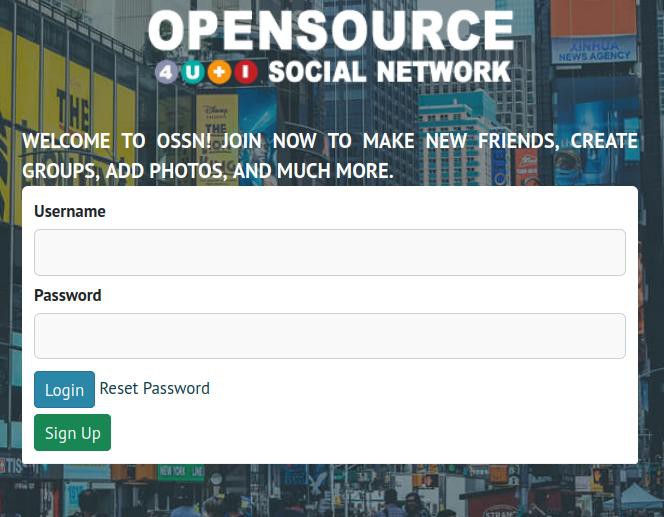
Right that's what dev5 is doing - plus moving the Sign Up button inside of the widget-contents div.
Michael Zülsdorff
Replied 3 years ago
Yeah, commenting out that line 41 is a good idea at first sight, but unfortunately the widget refuses to display if no title string is passed. :(
To understand why, let's locate it ...
Called as echo ossn_plugin_view('widget/view', ....
it must be part of a plugins/default subdirectory
and if you have shell access, just run
find . -name widget
inside of your Ossn installation and you'll see: it's part of any Ossn theme!
The next idea might be to change the logic inside of view.php - but since these widgets are used in several other places it needs a different solution. I'll try to implement it with dev5 tomorrow ...
Michael Zülsdorff
Replied 3 years ago
Perfect? Hmm ... but didn't you want to replace "Create an account" by "Sign Up" ?
Let's take the chance and have a closer look into Ossn's localization part...
Very similar to the plugin mechanism I explained in my first comment, translations are retrieved by
- first looping through all the files located in
~/locale/..... - next looping through all the files located in
~/ANY_ENABLED_THEME/locale/..... - next looping through all the files located in
~/ANY_ENABLED_COMPONENT/locale/.....
Thus, if you want "Create an account" to be replaced by something different, instead of editing the core language file, you just have to create your own language file inside of your component and apply the change there. This way you never have to care about upcoming core updates - your own translation will stay safe in place as long as your component is enabled.
See the changes made in dev4 and for more details about translating Ossn read https://www.opensource-socialnetwork.org/wiki/view/2132/how-to-translate-ossn
David Booth
Replied 3 years ago
Me just being fussy now:
I'm trying to modify to remove <div class="widget-heading">Login</div> - because the Login label on the button suffices.
I have shell access so I grep various strings but haven't found the source.
Nearest I got was thinking to comment out line 41
'title' => ossn_print('site:login'),
from the index page in the component but then the whole dialogue disappears.
(Just as well I backed up!)
David Booth
Replied 3 years ago
2 fields and 3 buttons. Perfect!
Wow.