MenuBuilder Download 8.1

 Arsalan Shah
7 years ago
Arsalan Shah
7 years ago
This will allow you to add menu links from administrator area. No need to program your component to add menu links. For example you can add links into sidebar, footer, topbar dropdown, administrator menu. Requires OSSN v5.0
V6.3
- Topbar menu dropdown showing double icons

Erassus ︎ ︎
Replied 5 years ago
Tested in white theme, working fine.
Thanks.
Arsalan Shah
Replied 5 years ago
Try version 5.0.
Erassus ︎ ︎
Replied 5 years ago
I can confirm this problem with the latest OSSN (6.1+)
The version 4.0 shows all the Font awesome icons, but when you add a menu, this doesnt show up in the homepage.
The version 3.0 works fine but you can only use a fews icons, because a lot are missing or doesnt show up.
So the only way is use 3.0 with only a few icons.
Tested with goblue and white theme too.
Oliver Mankewitz
Replied 5 years ago
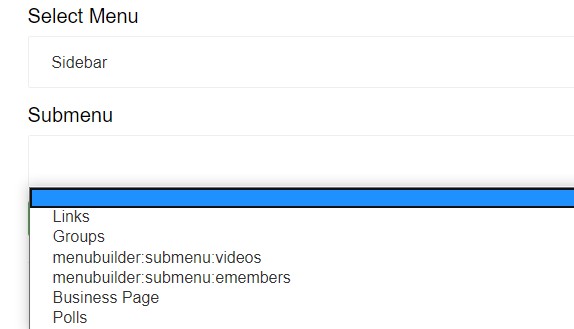
When I select the sidebar as the target for the link, a selected icon is not displayed. In all other targets it seems to work. I have tried footer, admin and profile pages. There the display is correct. Can anyone confirm this problem?
Arsalan Shah
Replied 5 years ago
@Fouad its been replaced with fontawesome 5 now

Fouad Moussaoui
Replied 5 years ago
I would love to change theese icons by myself for a new ones .. The question .. Is there any component for that ? Do I have to do it by myself ? Or do you have any other suggestions .

David Futó
Replied 6 years ago
Hi
It would be nice if you can edit it after saving.
And sort the items.
Arsalan Shah
Replied 6 years ago
@zetman thanks for feedback!

Michael Zülsdorff
Replied 6 years ago
I can confirm it's working flawlessly with GreenByGreen v 1.29
Nice!
Arsalan Shah
Replied 6 years ago
@mary,
I am afraid this doesn't allow to add secondary pages this is menu builder component and adds a menus in different possible places.
You can add a new link within Groups , Videos etc... You need to make sure you selected sidebar in menu and then submenu