Using NGINX Reverse Proxy


Hello,
I am currently trying to self host an OSSN site, but am running into some issues. I am trying to use NGINX reverse proxy to accomplish running many different DIY web servers, but also want to take advantage of being able to connect to the OSSN over https. As it currently stands, I have the reverse proxy working, but get no CSS.
My config.site.php currently has $Ossn->url = "http://{$_SERVER['SERVER_NAME']}/";
If I change the url to (https://social.builtforgeeks.com/ME']}/") or (https://social.builtforgeeks.com/) all I get is a blank page.
I tried following this discussion here but am struggling to understand it as I am very new to web hosting.
https://www.opensource-socialnetwork.org/discussion/view/3655/connecting-though-a-reverse-proxy-to-ossn-server?offset=2
Any help or guidance would be much appreciated.
If using OSSN:
OSSN version: 6.6
Website URL (optional): https://social.builtforgeeks.com/administrator
I got it! You're answer was a big part of it. For those who might follow in my footsteps, I'll try and list the instructions as best I can.
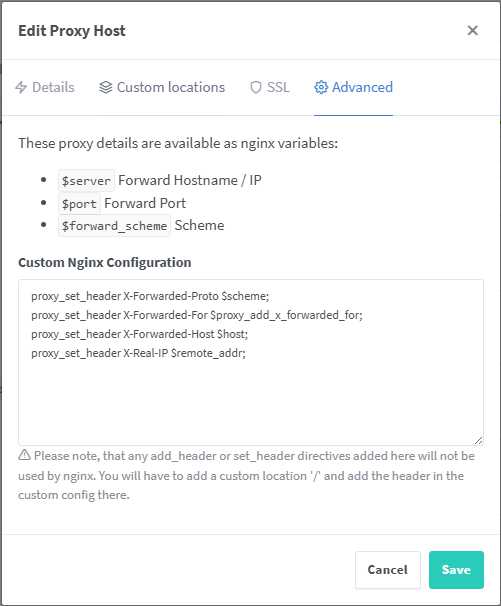
Setup NGINX proxy manger to use SSL then add the following code in the "Advanced Section" of the hostname:
proxy_set_header X-Forwarded-Proto $scheme;
proxy_set_header X-Forwarded-For $proxy_add_x_forwarded_for;
proxy_set_header X-Forwarded-Host $host;
proxy_set_header X-Real-IP $remote_addr;
Open ossn.config.site.php (Located for Me: /var/www/html/configurations) and make the following edits.
Add the following code before $Ossn-> url
 if (isset($_SERVER['HTTP_X_FORWARDED_PROTO']) && $_SERVER['HTTP_X_FORWARDED_PROTO'] === 'https') {
    $_SERVER['HTTPS'] = 'on';
}
change the $Ossn->url = "https://yourdomain.com/"
Pictured Example

Clear browser cache (May not be needed) and all should be working.

From your website it appeared to be css working fine you need to edit
configurations/ossn.config.site.php and change it to https from http (site url) note that site url must be static
$Ossn->url = "https://social.builtforgeeks.com/";
Not
$Ossn->url = "http://{$_SERVER['SERVER_NAME']}/";
Correct me if I am wrong, but I believe that is for running the OSSN on NGINX rather than Apache. I am fine leaving the web server running on Apache (I just used the .OVA file from the OSSN download page). I just want to put it behind a reverse proxy, which in this case is "NGINX Proxy Manager"
Due to the many requests in the past for additonal features and components we have decided to develope a premium version. Features like Hashtags, Videos, Polls, Events, Stories, Link Preview, etc included in it.
 $199 (Life Time)
Learn More