How to replace icons?


hello!
How can I replace the icons marked on the screenshot with my own symbols like "fa-home" or stuff from Font Awesome?

I tried following:
    ossn_register_menu_item('newsfeed', array(
        'name' => 'friends',
        'text' => ossn_print('friends'),
        'parent' => 'profile',
    'icon'   => 'fa-solid fa-user',
        'href' => $user->profileURL('/friends'),
    ));
thank you

If you look your inspect elements of browser each item have own class and the list element have icon (i) element class with pseudo element that you can use css to set other icon. Example
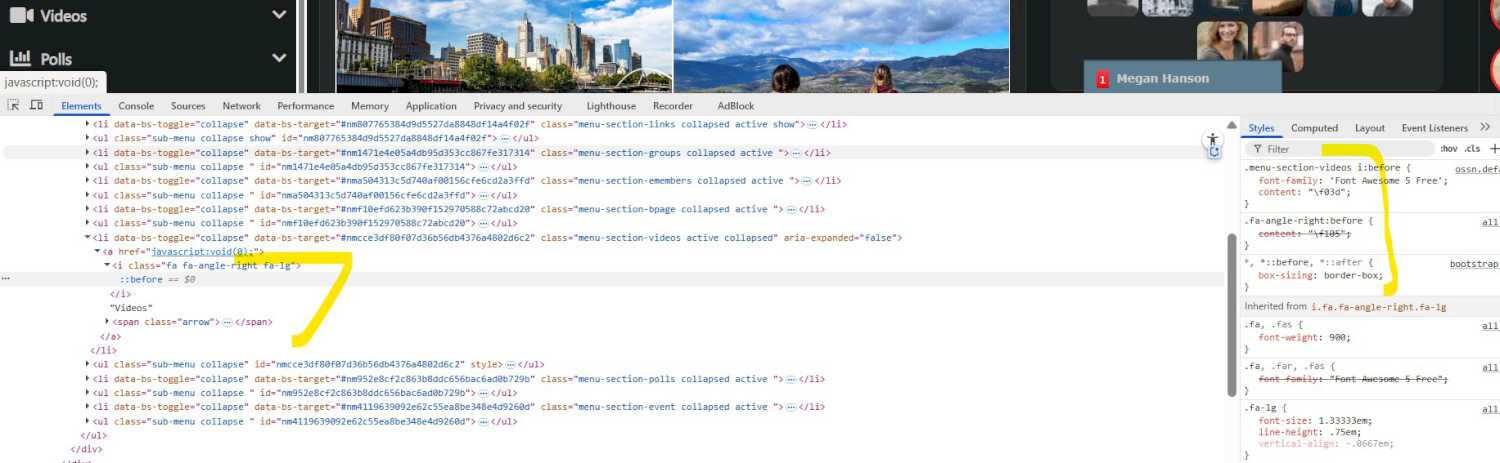
Also why don't you see how other components have done that?
Talking about installation without modification and i am not sure if you have done modification and how your menu elements source look like.
So, I tried to set an icon for a menu value:
My custom_newsfeed.php has this part, I removed the right-angle icon
<?php
foreach ($menus as $name => $menu) {
	$section = 'menu-section-'.OssnTranslit::urlize($name).' ';
	$items = 'menu-section-items-'.OssnTranslit::urlize($name).' ';

	$expend = '';
	$icon = "";
	if($name == 'links'){
		$expend = 'show';
		$icon = "fa-newspaper";
	}
	if($name  == 'groups'){
		$icon = "fa-users";
	}
	    if($name  == 'profile'){
        $expend = 'show';
    }
	$hash = 'nm'.md5($name);
    ?>
And my ossn_print.php this:
        $language = $user->language;
    if ($language === 'de') {
        ossn_register_menu_item('newsfeed', array(
            'name' => 'useful:links',
			'text' => '<i class="fas fa-lightbulb"></i> ' . ossn_print('coming:out'),
            'parent' => 'useful:links',
            'href' => ossn_site_url("p/2187/tipps-fur-dein-coming-out"),
        ));
    } else {
        // fallback oder explizit englisch
        ossn_register_menu_item('newsfeed', array(
            'name' => 'useful:links',
            'text' => ossn_print('coming:out'),
            'parent' => 'useful:links',
            'href' => ossn_site_url("p/2188/coming-out-advice"),
        ));
    }
But how can I delete the right angle on the menu item?

thank you, it works!!!

Okay, here we go
-
rename your own
newsfeed.phptocustom_newsfeed.php
This will prevent it being replaced by the theme and make it stay in memory -
remove the callback and its function
-
Instead, we're using this hook now:
ossn_add_hook('halt', 'view:themes/' . ossn_site_settings('theme') . '/plugins/default/menus/sections/newsfeed', 'com_SidebarRearrange_plugin_replace');
And this hook function
function com_SidebarRearrange_plugin_replace($hook, $type, $return, $params) {
   return ossn_plugin_view('menus/sections/custom_newsfeed', $params);
}
Oops, tried to post the cache issue close before your post - but it seems to be dropped..
But hold on - I'll post a new solution soon
Thank You!
It works when cache is disabled but as soon as I enable the cache, the newsfeed.php is ignored again
If I disable the cache, it is working again 😅
this is my ossn_com, I removed a few lines to make it shorter
<?php
/**
 * Open Source Social Network
 *
 * @package   Dominik Lieger
 * @author    Dominik Lieger
 * @license   GPL v2 https://www.gnu.org/licenses/old-licenses/gpl-2.0.html
 * @link      https://www.example.com
 */
// Funktion, die dein eigenes Menü hinzufügt und das "Links"-Menü entfernt
function sidebar() {
    ossn_extend_view('css/ossn.default', 'css/sidebar');

    // Überprüfen, ob der Benutzer eingeloggt ist
    $user = ossn_loggedin_user();

    if ($user) {

ossn_register_callback('menu', 'section:before:view', 'com_SidebarRearrange_plugin_reload');

        ossn_register_menu_item('newsfeed', array(
            'name' => 'home',
            'text' => ossn_print('home'),
            'href' => ossn_site_url(),
            'parent' => 'profile',
            'priority' => 0,
        ));

        ossn_register_sections_menu('newsfeed', array(
            'name' => 'profile',
            'text' => ossn_print('meinprofil'),
            'href' => $user->profileURL(''),
			'section' => 'profile',
        ));


        ossn_register_menu_item('newsfeed', array(
            'name' => 'profileviews',
            'text' => ossn_print('profileviews'),
            'parent' => 'profile',
            'href' => ossn_site_url("profileviews"),
        ));
    }
}

function com_SidebarRearrange_plugin_reload($event, $type, $params) {
   ossn_register_plugins_by_path(ossn_route()->com . 'SidebarRearrange/plugins/');
}

// Callback zur Initialisierung
ossn_register_callback('ossn', 'init', 'sidebar');
In the newsfeed.php I added
if($name == 'profile'){
	$expend = 'show';
	$icon = "fa-newspaper";
}
I'm sorry, I haven't had in mind that the loading order of plugins is system->components->theme. In other words: Theme plugins have the highest priority and can not be replaced by component plugins that easy way. But we can use a callback to force a reload of your own component's plugins again. In your com file add this line right after
if ($user) {
ossn_register_callback('menu', 'section:before:view', 'com_SidebarRearrange_plugin_reload');
Then, somewhere at the end of your com file add the accompanying new function like
function com_SidebarRearrange_plugin_reload($event, $type, $params) {
   ossn_register_plugins_by_path(ossn_route()->com . 'SidebarRearrange/plugins/');
}
Check your log again - your own newsfeed.php will be loaded now. (And don't use echo in general for debugging Ossn)
I placed error_log("Test: Sidebar Menu loaded"); at the beginning of the newsfeed.php in component folder, but when reloading the website or triggering the menu, nothing happens
Also tried with echo "Test: Sidebar Menu loaded"; - nothing - so the file is ignored
Because I did what you said, add 'section' => 'dominik', and then change newsfeed.php in my component folder to
        if($name == 'profile'){
    $expend = 'show';
    $icon = "fa-user";

}
but it just adds a new section which is not expanded and has no icon, so I guess the newsfeed.php in my component folder is not recognized?
I am a little bit confused
When I add it like this:
function sidebar() {
    ossn_extend_view('css/ossn.default', 'css/sidebar');

    // Überprüfen, ob der Benutzer eingeloggt ist
    $user = ossn_loggedin_user();

    if ($user) {
        ossn_register_menu_item('newsfeed', array(
            'name' => 'home',
            'text' => ossn_print('home'),
            'href' => ossn_site_url(),
            'parent' => 'profile',
            'priority' => 0,
        ));

        ossn_register_sections_menu('newsfeed', array(
            'name' => 'profile',
            'text' => ossn_print('meinprofil'),
            'href' => $user->profileURL(''),
			'section' => 'profile1',


        ));
Do i have to change every other"parent" in ossn_register_menu_item from profile to profile 1?
Like this?
function sidebar() {
ossn_extend_view('css/ossn.default', 'css/sidebar');

// Überprüfen, ob der Benutzer eingeloggt ist
$user = ossn_loggedin_user();

if ($user) {
    ossn_register_menu_item('newsfeed', array(
        'name' => 'home',
        'text' => ossn_print('home'),
        'href' => ossn_site_url(),
        'parent' => 'profile1',
        'priority' => 0,
    ));

    ossn_register_sections_menu('newsfeed', array(
        'name' => 'profile',
        'text' => ossn_print('meinprofil'),
        'href' => $user->profileURL(''),
		'section' => 'profile1',


    ));

    ossn_register_menu_item('newsfeed', array(
        'name' => 'friends',
        'text' => ossn_print('friends'),
        'parent' => 'profile1',
        'href' => $user->profileURL('/friends'),
    ));
Due to the many requests in the past for additonal features and components we have decided to develope a premium version. Features like Hashtags, Videos, Polls, Events, Stories, Link Preview, etc included in it.
 $199 (Life Time)
Learn More